


TLS is an enhanced SSL modification that protects data when it is transmitted over the Internet. The use of the obsolete SSL protocol leads to vulnerabilities that can be avoided by switching to TLS.
What is TLS protocol
The TLS protocol is an abbreviation of “transport layer security”, which is translated from English as a protocol of “transport layer protection”. This protocol was created with the same purpose as its predecessor SSL – to protect data on the Internet. At the same time, it has additional features that allow using the protocol not only in browsers, but also in instant messengers, IP-telephony.
This protocol is regularly improved and updated by the IETF to ensure strong encryption, authentication, and data integrity. The latest version of the specification at the moment – TLS 1.3, which appeared in August 2018.
The need for an updated data protection protocol arose back in 1999, because the SSL protocol found vulnerabilities. Now all versions of the SSL protocol have been successfully attacked using POODLE. This attack allows you to substitute user data and decrypt the information transmitted over a secure data channel, byte-by-byte.
What is the difference between SSL and TLS protocols?
Given that the TLS protocol is based on SSL, the two options are quite similar. In fact, we can assume that the version of TLS 1.0 is SSLv3.1. The development of protocols involved in various companies – SSL created by Netscape, TLS – IEFL.
TLS has some differences with the SSL protocol: keys and a list of font sets are different, there is a difference in the pseudo-random PRF function and the HMAC hashing function used to build a block of symmetric keys when encrypting data. A number of algorithms have been added to the TLS protocol to ensure the safety of the data transmission channel.
In fact, many users continue to call the TLS protocol “SSL encryption”. This term has become ubiquitous and is usually used by suppliers who actually offer TLS protection:
SSL vs TLS
Many web developers are wondering which protocol to choose — SSL or TLS. Given the identified vulnerability, the SSL protocol should be replaced with TLS as recommended by security experts. When you purchase a security certificate, you need to pay attention to what encryption standards the company provides, providing a secure communication channel:
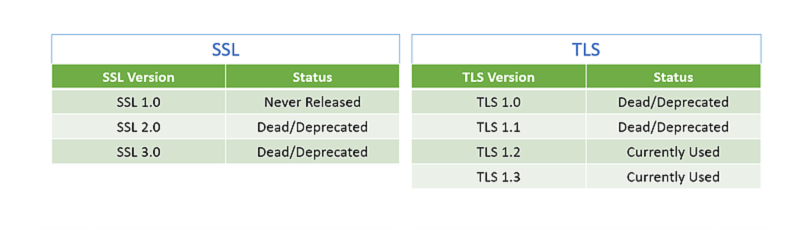
The certificate specifications must state that one of the latest versions of the TLS protocol specification is used. The version should be taken into account, since the TLS 1.0 and TLS 1.1 protocols revealed vulnerabilities that have been eliminated in newer specifications.
TLS 1.0 vs 1.2 – how to install the most secure version of the protocol
The TLS 1.2 protocol is a newer and more secure version, which is preferably used to protect information on websites – such recommendations are given by cryptographic specialists.
Google experts revealed a fundamental flaw in the RC4 cipher used in TLS 1.0 and 1.1. The tests determined that these versions are not safe enough, the identified vulnerability is classified as CVE-2014-8730.
To provide reliable data protection, modern protocols use 256-bit encryption keys, which are almost impossible to attack successfully.
To check the current version of the protocol used on the site, you can use the SSL-checker service. This tool allows you to get a detailed report on the SSL and TLS versions used in the project.
To check, enter the domain address and click “Check SSL / TLS”:
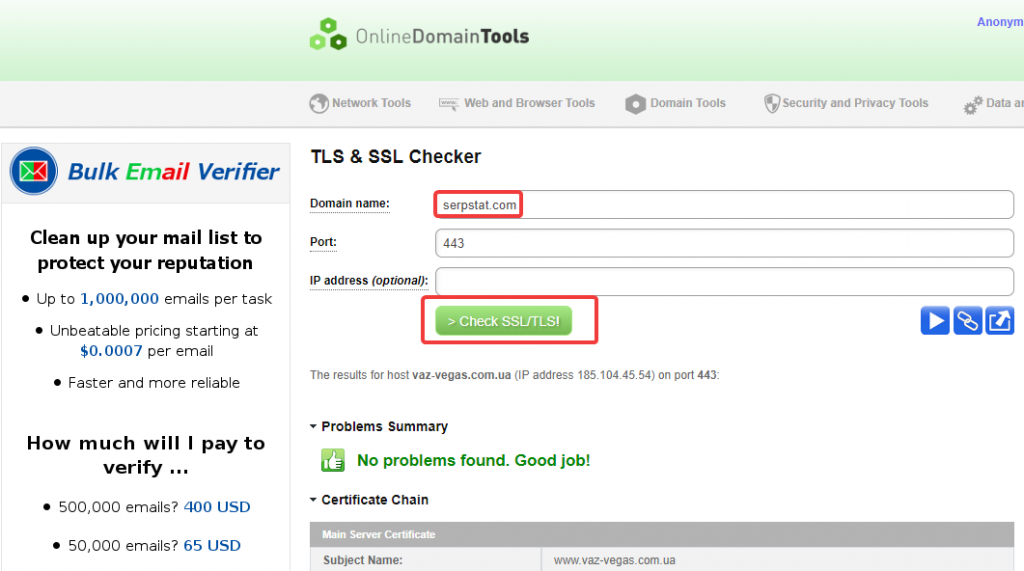
The report will describe all versions of the protocols that are used to protect information:

If the site has security issues, you need to update the version of the TLS protocol. Settings will be different for different server types.
For example, to register an update of the TLS version on the Nginx server, you need to enable the SSL parameter on listening sockets, placing it in the server block. Additionally, you must specify the address of the files with the server certificate and private key:
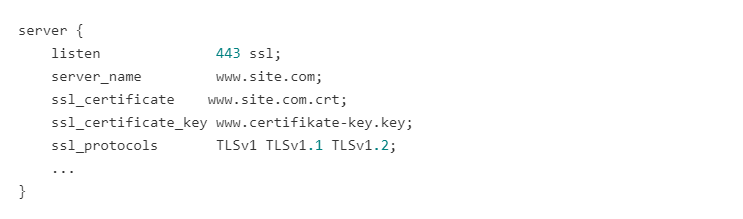
After the server is configured in accordance with the instructions, the secure version of the TLS 1.2 certificate will work on the site.
Conclusion
TLS is a modified version of SSL designed to create a secure data channel on the network. To ensure maximum protection of data on the site, you must install a proven version of the protocol.
At the moment, cryptographers consider safe and stable versions from TLS 1.2 and higher.
To install a secure version of an SSL certificate, you need to pay attention to its characteristics, since the TLS protocol must be at least version 1.2. The received certificate must be registered in the server settings with the indication of the required version of TLS.


